Here’s a complete guide to MTN YouTube Buffet Bundle plans and subscription codes — what they are, the prices, how to activate them, and tips to make the most of them on MTN Nigeria. This type of bundle gives you special data just for watching YouTube videos at more affordable rates than regular data, ideal if YouTube is your main app.
What YouTube Buffet Bundles Are
The MTN YouTube Buffet Bundle is a special streaming data plan that lets you watch YouTube videos using a dedicated allocation of data that’s designed for video streaming — and typically cheaper per megabyte compared to normal internet data. YouTube Buffet bundles are time-based in how long the subscription lasts and how long you can stream.
It’s perfect if YouTube is the main app you use for entertainment, learning, or music videos, and you want better value for that specific use.
MTN YouTube Buffet Bundle Plans & Prices
Below are the key YouTube Buffet plans offered on MTN, including how much data you get, how long you can use it, and how long it lasts.
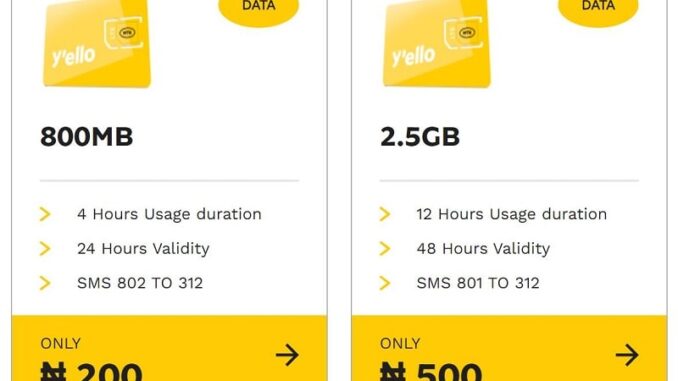
1. ₦200 – 800 MB YouTube Buffet Daily Bundle
- Price: ₦200
- Data: 800 MB dedicated to YouTube streaming
- Usage Duration: Up to 4 hours of streaming
- Validity: 24 hours from activation
- Best For: Short sessions of watching videos or music clips when you need daily access without heavy data use
This is the entry-level YouTube bundle on MTN and is useful if you just want a little data for specific watching in one day.
2. ₦500 – 2.5 GB YouTube Buffet 2-Day Bundle
- Price: ₦500
- Data: 2.5 GB for YouTube
- Usage Duration: Up to 12 hours of streaming
- Validity: 48 hours (2 days)
- Best For: Longer watching sessions and big videos like movies or multiple playlists
This plan gives more streaming time and more flexible use over two days, making it good if you’ll be watching a lot of YouTube content over a weekend or multi-day period.
How to Subscribe (Activate the Bundles)
MTN offers multiple ways to activate YouTube Buffet bundles directly from your phone without needing any apps.
1. SMS Subscription (Fastest Method)
You can subscribe by sending specific codes to the MTN service number:
- To subscribe to the 800 MB (₦200) plan:
Send 802 to 312 - To subscribe to the 2.5 GB (₦500) plan:
Send 801 to 312
After sending the message, you should receive a confirmation SMS asking you to accept before the bundle is activated.
2. USSD Code Subscription
You can also use a USSD menu to choose the YouTube Buffet bundle:
- Open your phone dialer
- Dial
*312*1#or*904# - Follow the on-screen prompts to select the YouTube Buffet plan you want
- Confirm to subscribe and pay with your airtime credit
This method lets you browse all available bundles and pick one that fits your needs without remembering specific SMS codes.
3. Using the MyMTN App / myMTN Web
If you prefer a graphical interface:
- Open the MyMTN app or log in at the myMTN web portal
- Navigate to Data bundles or YouTube Buffet Bundles
- Select the plan you want
- Pay with airtime or debit card in-app and confirm the subscription
This option is convenient if you want visual menus and bundle details, plus purchase history.
How It Works
Dedicated vs. Normal Data
The YouTube Buffet data is generally limited to YouTube video streaming, meaning you can only watch YouTube — not browse other sites — with that allocation. But because it’s for a specific app, it’s usually more cost-efficient than buying general data and using it for YouTube.
Usage Duration
Each bundle includes allowed streaming time (e.g., 4 or 12 hours). Once you’ve streamed for that amount of time, the data bundle expires even if you haven’t used all the megabytes. Make sure to use it within its valid period.
Validity
The time you have to use the bundle (e.g., 24 or 48 hours) starts counting from the moment you activate it, so plan accordingly if you want to stream over a certain timeframe.
Tips & Useful Notes
Can You Buy Multiple Bundles?
Yes — you can buy another YouTube Buffet bundle while one is still active, but most networks will only start the next one once the current one expires. So the remaining time or data won’t stack immediately; it queues instead.
How to Check Your YouTube Data Balance
To check how much of your YouTube streaming bundle you’ve used or has left, you can dial a dedicated check code (for example *323*4#) and follow the prompts — useful to avoid surprise expiries.
Turn Off Auto-Renewal
If you don’t want a plan to auto-renew (i.e., purchase again automatically when it expires), you can cancel or turn off auto-renewal via the same USSD menus or by sending “STOP” to 312 after active subscription — useful if you want control over monthly savings or renewals.
Use During Peak Times
Streaming data usage often slows slightly during busy hours; if you want better viewing quality or fewer interruptions, use the bundle during non-peak times when possible.
Final Summary
MTN’s YouTube Buffet bundles are value-focused video streaming data plans that let you watch YouTube without using up more expensive general data. You can pick plans that suit short daily use or longer multi-day watching sessions, like:
- ₦200 for 800 MB with 4 hours of streaming and 24-hour validity
- ₦500 for 2.5 GB with 12 hours of streaming and 48-hour validity
Activate them easily via SMS, USSD codes, or the MyMTN app, and always check your balance so you know how much time you have left.
Leave a Reply