Ever wished you could forward your calls from one line to another so you don’t have to carry multiple phones everywhere? Or maybe you’ve set up call forwarding before and now want to turn it off?
This complete guide shows you how to activate and deactivate call forwarding on MTN, Glo, Airtel, and 9mobile in Nigeria — step by step.
Why You Might Want to Use Call Forwarding
Call forwarding is a handy feature that lets you redirect incoming calls from one number to another — so you never miss an important call.
It’s especially useful if:
- You use multiple phones and want all calls routed to one device.
- You’re in a poor network area or your phone is switched off.
- You’re busy and want someone else to take your calls.
Note: Some networks may charge a small fee for forwarded calls, and performance depends on network stability.
How to Activate or Deactivate Call Forwarding on Nigerian Networks
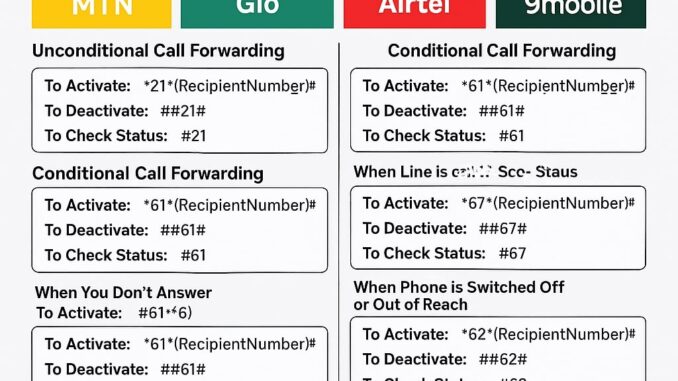
Below are the USSD codes to activate, deactivate, and check the status of call forwarding on all major networks.
MTN Call Forwarding Codes
MTN lets you forward calls unconditionally (all calls) or conditionally (only in certain situations).
Unconditional Call Forwarding (All Calls)
Activate: **21*RecipientNumber#
Deactivate: ##21#
Check Status: *#21#
Conditional Call Forwarding
When You Don’t Answer:
- Activate:
**61*RecipientNumber# - Deactivate:
##61# - Check:
*#61#
When Line is Busy:
- Activate:
**67*RecipientNumber# - Deactivate:
##67# - Check:
*#67#
When Phone is Off or Out of Reach:
- Activate:
**62*RecipientNumber# - Deactivate:
##62# - Check:
*#62#
Glo Call Forwarding Codes
Unconditional (All Calls)
- Activate:
**21*RecipientNumber# - Deactivate:
##21# - Check:
*#21#
Conditional Call Forwarding
When Not Answered:
- Activate:
**61*RecipientNumber# - Deactivate:
##61# - Check:
*#61#
When Busy:
- Activate:
**67*RecipientNumber# - Deactivate:
##67# - Check:
*#67#
When Out of Reach/Switched Off:
- Activate:
**62*RecipientNumber# - Deactivate:
##62# - Check:
*#62#
Airtel Call Forwarding Codes
Unconditional (All Calls)
- Activate:
**21*RecipientNumber# - Deactivate:
##21# - Check:
*#21#
Conditional Call Forwarding
When You Don’t Answer:
- Activate:
**61*RecipientNumber# - Deactivate:
##61# - Check:
*#61#
When Busy:
- Activate:
**67*RecipientNumber# - Deactivate:
##67# - Check:
*#67#
When Unreachable or Switched Off:
- Activate:
**62*RecipientNumber# - Deactivate:
##62# - Check:
*#62#
9mobile (Etisalat) Call Forwarding Codes
Unconditional (All Calls)
- Activate:
**21*RecipientNumber# - Deactivate:
##21# - Check:
*#21#
Conditional Call Forwarding
When You Don’t Answer:
- Activate:
**61*RecipientNumber# - Deactivate:
##61# - Check:
*#61#
When Busy:
- Activate:
**67*RecipientNumber# - Deactivate:
##67# - Check:
*#67#
When Out of Reach or Switched Off:
- Activate:
**62*RecipientNumber# - Deactivate:
##62# - Check:
*#62#
Pro Tip
Use conditional forwarding if you only want calls forwarded when you can’t answer or when your phone is off.
Use unconditional forwarding cautiously — it redirects all your calls automatically.
Final Thoughts
Call forwarding helps you stay reachable anytime, anywhere.
It’s especially useful for business owners, professionals, or anyone managing multiple lines.
Just remember to deactivate it when you no longer need it — and always confirm charges with your service provider.
Leave a Reply