MTN Smart Data is an intelligent data bundle system on MTN Nigeria’s network that offers tailored internet packages — daily, weekly, or monthly — based on your browsing needs. Smart Data plans are accessible through a dedicated USSD code menu and are ideal if you want flexible data options with good value for money.
Unlike standard data plans that only provide a fixed data volume for a fixed duration, Smart Data sometimes include adaptive offers — meaning that some plans might increase your total gigabytes based on usage patterns and renewals.
How to Subscribe to MTN Smart Data Plans
There are several ways to subscribe to Smart Data plans:
1. USSD Code (Fastest Method)
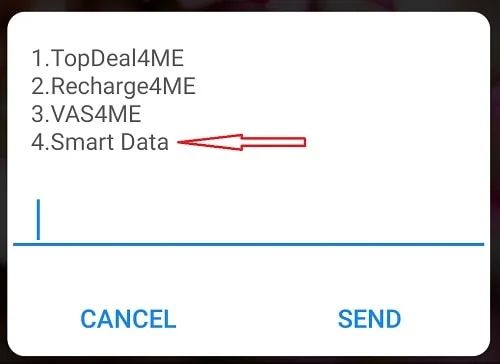
- *Dial 121# on your MTN line.
- Select option for “Smart Data” (usually option 4).
- Choose the category: Daily, Weekly or Monthly.
- Pick the plan you want and confirm.
This menu shows the available Smart Data bundles and lets you choose the plan that suits your usage and budget.
2. myMTN App
- Get the myMTN app from the Play Store or App Store.
- Log in with your MTN number.
- Go to “Data Plans” and select “Smart Data”.
- Choose and subscribe to a plan.
Using the app also makes it easier to track your data usage and manage subscriptions.
3. MTN Website / Self-Service Portal
- Log into your MTN account online and choose the Smart Data bundle you prefer.
MTN Smart Data Plans & Prices (2026)
Below are representative Smart Data bundles and prices you’ll find in 2026. Exact availability may vary, and sometimes MTN adds bonuses or additional gigabytes on renewals.
Daily Smart Data Plans
Daily plans are perfect for light users or short high-speed browsing sessions.
- 1.5 GB — ₦300 (valid 24 hrs)
- 2 GB — ₦400 (valid 24 hrs)
These plans are affordable for students or casual internet users and suit messaging, social media, and light browsing.
🗓 Weekly Smart Data Plans
Weekly plans give you a larger data allowance for seven days, suitable for heavier users who browse frequently but don’t want a monthly commitment.
- 11 GB — ₦2,000
- 13 GB — ₦3,000
Weekly plans are good for browsing, streaming short videos, social media, and school research.
14-Day Smart Data Plans
Some Smart Data menus also include 14-day (two-week) offers — giving a balance between weekly and monthly plans.
- 18 GB — ₦4,000
- 35 GB — ₦7,000
These are ideal if you want more data than a weekly plan without committing to a 30-day subscription.
Monthly Smart Data Plans
Monthly plans are often the most cost-effective for regular users — especially those who stream videos, use social media frequently, or work online.
Typical monthly Smart Data offers may include:
- Large monthly bundles (exact volumes and pricing can vary) — often ranging between tens of gigabytes for ₦6,000–₦25,000+ per month.
Monthly options provide the best value per megabyte for continuous internet users.
Smart Data Menu Breakdown
When you dial *121# and choose Smart Data, you’ll usually see menu categories like:
- Daily Plans
- Weekly Plans
- Monthly Plans
- Special Offers (sometimes appears depending on promotions)
You can navigate by replying with the number next to the option and selecting the plan you want.
How to Check Your Data Balance
Once you’ve subscribed to a Smart Data plan, it’s important to check your remaining data and validity.
Here’s how to check:
- USSD: Dial *323# to view your remaining data balance.
- SMS: Text 2 to 323.
- myMTN App: View current data balances on the app dashboard.
This helps you know exactly how much data you still have and when it’s about to expire — so you don’t run out suddenly.
Auto-Renew & Data Management
When subscribing via the USSD menu, MTN often gives you options like:
- Auto-Renew – Automatically renew the same plan when it expires.
- One-Off Purchase – Subscribe only once with no auto-renew.
- Buy for a Friend – Gift data to another MTN user.
Auto-renew is useful if you want uninterrupted data every month without repeating the process manually.
Also, on the myMTN app you can track data usage and set warnings so you don’t use your balance too fast.
Tips for Getting the Most from Smart Data
Here are some useful tips:
Track Usage
Use the myMTN app to see which apps are consuming your data. Some apps use a lot of data in the background.
Auto-Play Videos
Turn off auto-play in apps like Facebook, TikTok, or Instagram to save data.
Wi-Fi When Possible
Connect to Wi-Fi (at school, work, or home) to save your MTN Smart Data for when you really need it.
Compare Plans
Before subscribing, check daily, weekly, and monthly rates — sometimes a weekly plan saves money compared to daily purchases if you use data often.
Conclusion
MTN Smart Data gives you flexible internet subscription options with daily, weekly, fortnightly, and monthly plans — ideal for different usage levels. You activate these plans via *121# or the myMTN app, and you can check your balance with *323#. Regular plans are affordable and competitive in value, while auto-renew and gifting options add convenience. By choosing the right Smart Data bundle and tracking your usage, you can stay connected without overspending.
Leave a Reply